One-Click Postman Collections from BitDive Unit and Integration Tests


We’re excited to introduce a major upgrade to the BitDive ecosystem: native Postman support.
You can now create a Postman Collection from your BitDive-generated JUnit replay tests with a single click. Postman export is an additional execution format alongside the BitDive runner, derived from the same Real Runtime Data replay artifacts, so you can rerun and share endpoint requests without changing your regression suite.
BitDive automatically creates unit and integration tests from recorded behavior, and it can now also export the tested application’s endpoint requests as Postman collections. This lets you invoke endpoints quickly, capture new executions back into BitDive, validate Consumer-Driven Contracts against real scenarios, and compare “before” vs “after” behavior with diffs after a fix.
Why This Matters
Automated regression suites are great at catching issues, but debugging is often manual.
When a test fails, developers usually want to rerun the exact request, inspect headers and payloads, and verify behavior quickly in a local, dev, or staging environment. Doing that by hand in Postman is slow and error prone, especially when requests include complex bodies, custom headers, or auth context.
With Export to Postman, BitDive removes the manual reconstruction step. You export the requests directly from the tests you already trust, import into Postman, and run them immediately.
How It Works
The export is driven by your BitDive test definitions, not by raw trace data. BitDive reads the HTTP request configuration used by your generated JUnit replay tests and converts it into a Postman Collection.
You control how much you export.
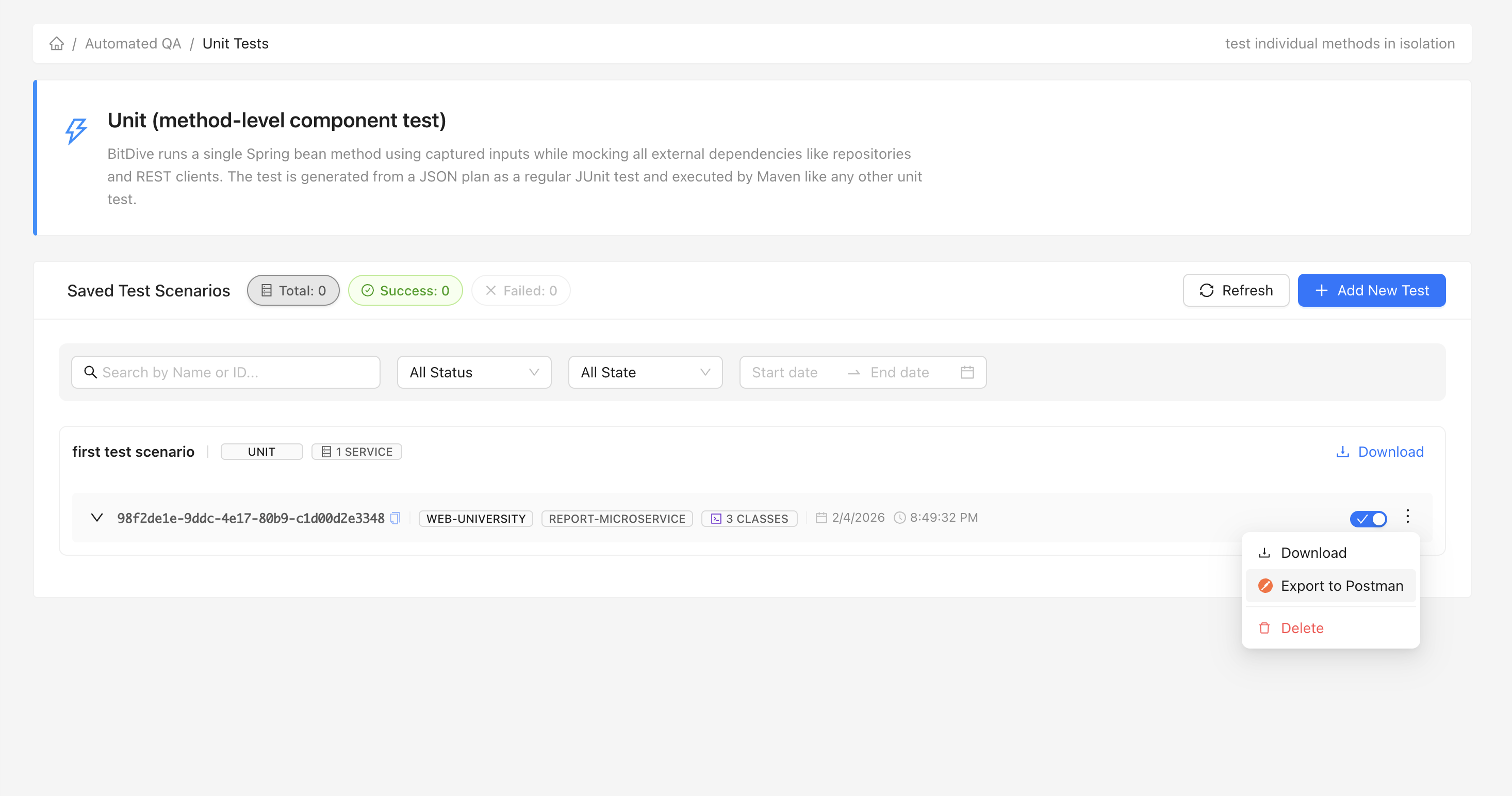
Export Entire Scenarios
Export a full scenario to get a single Postman collection that represents the full flow covered by your tests. This is ideal when you want to manually replay a complete user journey or share a reproducible workflow with someone else.
Export Specific Test Classes
Need only a small slice of the suite? Export an individual test class to get a targeted collection for a specific component or service.
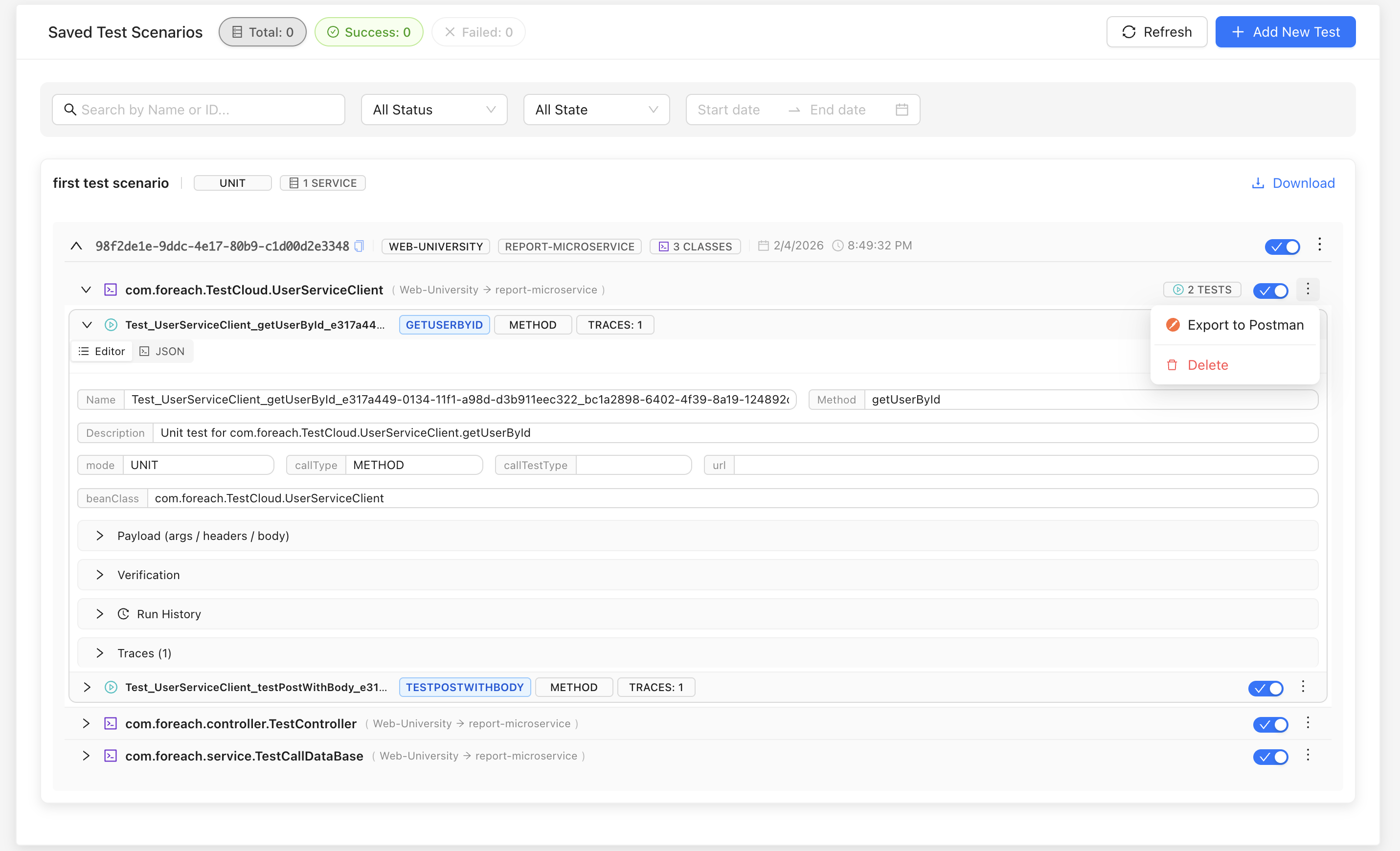
- Select Tests: Choose the tests, classes, or suites you want to run manually.
- Click Export: Hit "Export to Postman". BitDive builds a collection from your test configuration.
- Run in Postman: Import the generated JSON into Postman and click "Send".
Under the Hood
The exporter creates a Postman Collection v2.1.0 compliant file and focuses on practical compatibility:
- Test based creation: The collection is produced from BitDive’s generated JUnit replay tests (unit and integration), so Postman mirrors what your regression suite executes.
- Smart header processing: Request headers are normalized and formatted for Postman, so requests work out of the box.
- Scenario structure: If a scenario or test includes multiple HTTP calls, they are exported as separate requests in the same collection in a predictable order.
- Readable bodies: Request bodies are prettified for easier inspection, while keeping dynamic values intact.
Use Cases
1. Manual debugging for failed regression tests
When CI reports a failure, export the relevant scenario and rerun the same calls manually in Postman to inspect inputs and responses quickly.
2. Endpoint exploration without rebuilding requests
Use Postman as a convenient UI to explore the exact requests your tests use, without copying payloads, rewriting headers, or reassembling auth.
3. Quick verification in Dev or Staging
Run a small subset of calls against another environment to validate a hotfix before running the full regression suite.
4. A tight loop between manual runs and automated coverage
If you manually trigger additional paths in Postman and BitDive captures them as new recordings, you can convert them into new replay tests to expand regression coverage over real behavior.
Executable Documentation: The Tight Loop of Verification
Postman integration isn't just an export feature, it's part of the BitDive Implementation Loop:
- Discover: Identify an untested API edge case in your production traces.
- Execute: Export to Postman to manually explore the behavior and verify the contract.
- Automate: Once verified, BitDive automatically converts that validated trace into a permanent Trace Replay test.
- Scale: This ensures that "manual exploration" today becomes "automated regression coverage" tomorrow, without writing any test code.
From real behavior to repeatable regression verification
BitDive turns captured executions into deterministic JUnit replay tests. Now you can also export those test calls to Postman for fast manual validation.
Try BitDive TodayAvailable Now
This feature is available immediately for all BitDive users. Open your test dashboard to find the new "Export" option.
Happy Testing!